

A few weeks ago we were conducting a vRanger DR test of a VM (new host and new LUN).
The VM was restored succesfull, but when we powered it on we discovered that it for some unexplaned reason had lost the SCSI0:1 (100GB) and SCSI0:2(300GB) VMDK’s.
It had created two new 20GB VMDK’s instead.
We searched the LUN and found the two orginal *-flatvmdk files but not the descripter files.
Use Putty to identify the size of the *-flatvmdk file. ex. 100GB
ls -lah
From a VM (not running) create a new disk with the same size as the one you are missing. The name is not important.
Locate the newly created *.vmdk and *-flat.vmdk file. Copy the new *.vmdk file to the folder that contains the orginal *-flat.vmdk file.
cp rescue_me.vmdk /vmfs/volumes/mysan/rescued/rescued.vmdk
Use VI or NANO to change the following line as below from:
RW 419426200 VMFS “rescue_me-flat.vmdkâ€
To:
RW 419430500 VMFS “rescued-flat.vmdkâ€
Make sure that the name of the .vmdk file correspond to the SCSI*:*.fileName in the vmx file.
Now just power on the VM and the orginal disks are intac.
UPDATE
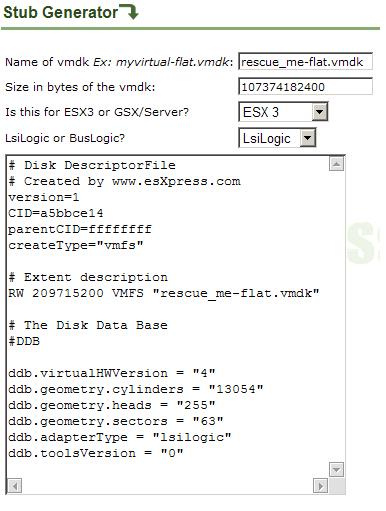
Today I found out that esXpress has created a website that can create a VMDK descriptor file.
http://www.esxpress.com/tools/wrapgen.php
Below is an exampel for the rescure_me-flat.vmdk file with a size of 100GB (107374182400 bytes)
I have a similar experience. The crashed VM left behind a flat.vmdk file, no other vmdk.
However, I am running enterprise ESX and tried the “Create a similar disk” trick.
All I get is a new vmdk file the same size as my flat.vmdk file (40Gb, 80Gb). I get no small descriptor file to modify and copy.
Am I missing something obvious?
Thanks
Hi Maurice
Where did you place the new VMDK’s – in another folder or in the same folder as the original VM ?
\\A. Mikkelsen
Thanks for the post A.M.
My customer ran out of disk space in the datastore and filled up the LUN. This must have scared off the .vmdk file because it was nowhere to be found.
I had to do a “service mgmt-vmware restart” at the console to get the machine to boot but your solution worked like a charm.
-Tim-
Hi Tim
Glad to be able to help.
A. Mikkelsen
Please can you help have a flat.vmdk file taht wont start i desperatly need your help
Hi Steven,
Did you get it to work?