

Friday I was at a customer to upgrade their ESXi 4.0 (free) to version 4.1.
This should have been an easy task, download CD, burn it and install.
This wasn’t the case, the new ESXi 4.1 wouldn’t install, it kept freezing during the extract of the cim.vgz file.
The problem occurred on both the Dell custom of ESXi 4.0 U1 and the standard ESXi 4.1.
We googled and googled but didn’t find a solution – in the end we blamed the error on the old bios version 1.1.4.
To my luck the customer still had the CD we installed the server with 9 months ago – ESXi 4.0.
We installed ESXi using the old CD and then everything was working – but we still needed to upgrade to ESXi 4.1.
So now what to do …….
Normally you use the hostupdate utility or the Remote CLI but the hostupdate utility is not included in the free version of ESXi and the we didn’t want to install the Remote CLI on the computer.
To my luck I had the hostupdate utility installed but i kept getting this error when trying to upgrade the ESXi host.
“Failed to read the upgrade package metadata.xmlâ€
The solution to our problem was:
- Since it was a ESXi free with out support, we decided to use the “ESXi command line interface”, witch is unsupported.
Follow this guide to enable it (http://www.bauer-power.net/2010/04/vmware-esxi-hack-to-allow-ssh.html). - Download and extract the upgrade ZIP file from VMware.
- From the VIclient, upload the extracted files to the host datastore, using the “datastore browser”
– I uploaded the files to a folder named “upgrade” - Put the ESXi host in “Maintance Mode”
– Since it is a ESXi, this can only be done when all VM’s are powered off. - Connect the the ESXi console using ex. Putty.exe.
- Navigate to the upgrade directory.
cd /vmfs/volumes/local-datastore/upgrade
- Begin the upgrade process
esxupdate update -m metadata.zip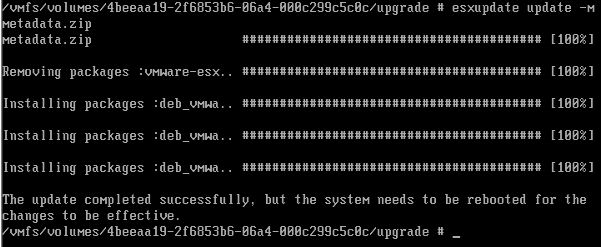
- When the upgrade is finished, reboot the host.
reboot
- To verify the new build number:
– Connect to the host using the VIclient
– Select the host
– Choose the “Summery” tab
– Verify that the ESXi version number and build has been updated
Thank you SO MUCH. This has made my upgrade from 4.0 to 4.1 so PAINLESS!!
Great guide.
Thanks.
Hello Anders,
Tripped over this little gem of an article. Now, being a nearly newbie in the upgrading-esxi business, I like to ask you to erase a few doubts;
My scenario is to upgrade a esxi 3.5 box to 4.1. I have dl an upgrade package: upgrade-from-ESXi3.5-to-4.1.0-0.0.260247-release.zip. Extracted to a folder, it has the same name(!). In it, I have a “metadata.xml”. I do not see a “metadata.zip” anywhere. Please help connect the dots 🙂
Thanks,
– Christian
Hi Christian,
Have you tried the Host Update utility?
Have you tried with the “metadata.xml”?
A. Mikkelsen
Christian,
I don’t think this solution will work on 3.5.
You have to use the Host Update Utility.
A. MIkkelsen
If you get the error:
/vmfs/volumes/4a97b524-063cb5d9-ff13-0030489c63a8/upgrade # esxupdate update -m metadata.zip
metadata.zip ######################################################################## [100%]
vmware-esx-tools-light-4.1.0-0.0.260247.i386.vib ###### ( 9%)
Encountered error FileIOError:
The error data is:
Filename – None
Message – I/O Error (28) on file : [Errno 28] No space left on device
Errno – 10
Description – Unable to create, write or read a file as expected.
then go to the Config-GUI and relacte /tmp/scratch to your local datastore, reboot and it should work …
“Hi Christian,
Have you tried the Host Update utility?
Have you tried with the “metadata.xmlâ€?”
No. I must admit I didn’t have the courage to experiment with metadata.xml
The Host Update utility seems difficult to find on VMWares site. What package could it be in?
Thanks,
– Christian
Hi Christian,
If you install the vSphere Client you are asked if you want to install the HostUpdate Utility
I not sure if the HostUpdate Utillity is avaiable in the vSphere Client in the free version of ESXi.
But it is in the vSphere Client version from vCenter.
A. Mikkelsen
Hello Anders,
thank you very much for this great guide!
One question to the configuration of the ESXi host. Will this be kept after the upgrade? Can I restart the updated host with the “old” configuration or is there a way to save the configuration and then to restore after the upgrade?
Thanks, Tom
Hi Tom,
The configuration is kept after upgrade.
To backup the configuration, please read one of the following guides.
http://professionalvmware.com/2010/05/how-to-backup-esxi-configuration-the-missing-piece/comment-page-1/
http://communities.vmware.com/thread/231705
The guides also explain how to restore 🙂
A. Mikkelsen
Thank you for this information. Great!
Glad to be able to help ..
A. Mikkelsen
Brill… thanks….
Glad to be able to help
tx. worked.
Hello!
This description is work!!! Excelent!!! 🙂
Thank You this!
I can upgrade my system 4.0 to 4.1 ESXi !!!!
Hi Tibor,
Glad to be able to help.
A. Mikkelsen
Thank you. This worked for me to upgrade from v4.0 to v4.1-Update1. I had physical access to the host, so I used the console there. Alt-F1, then type “unsupported”, then you’ll be prompted for a password.
Thanks for your feedback.
A. Mikkelsen